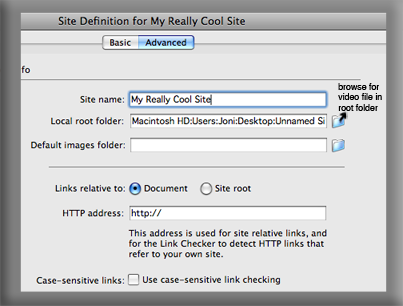
First, be sure you have a root folder on your computer that will contain ALL information for your website. Do not place anything contained on the website outside of this folder. After the folder is made, create a folder in which your flash (.swf) video file will be placed. Remember no spaces in any file names contained in your website.
Now, in order to place a video file on your site, you need to create a "new site" from the Site tab.

Under the Advanced tab, type in your site name (aka: My Really Cool Site.) Below this text field, it asks for the "local root folder." Browse for your root folder created in the previous step,leave the rest of the options default, and click ok. All information in your website is now officially read from your root folder.
Dreamweaver is kind enough to enter some basic code information automatically into our new site. But now we need to tell it to show our movie, so let's embed the video! To do this, place your curser in the body section of code to place the video within the body of the site. Now, select Insert from the very top of your screen, Media, Flash.
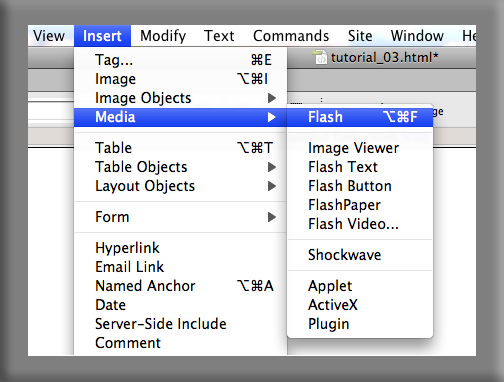
Select your .swf file inside of your root folder, and click "choose." Type in whatever you want the name of your movie to be (aka: This Movie Rocks) and click "choose."
T-da! Your html site should now have your video embedded and playing on your site (like the .swf file playing below.)
To check out your site online and see if your video is working, select File, Preview in Browser, and select the browser you wish to see it in (Safari, Fire Fox, Internet Explorer, etc.)
Hope you enjoyed this tutorial! The information on this site was gathered from a variety of books, and people. If you have any problems or can't get this to work, then I'm sorry but I actually have no clue what I'm doing either!
For more information on embedding video files (or anything dealing with html) visit google and find a plethara of answers.